
AI Call Analysis: Every Sales Call Scored and Summarized
AI call analysis for sales teams: a transcript, a score against your script, a summary and the next step for 100% of calls — not a 2–5% sample.
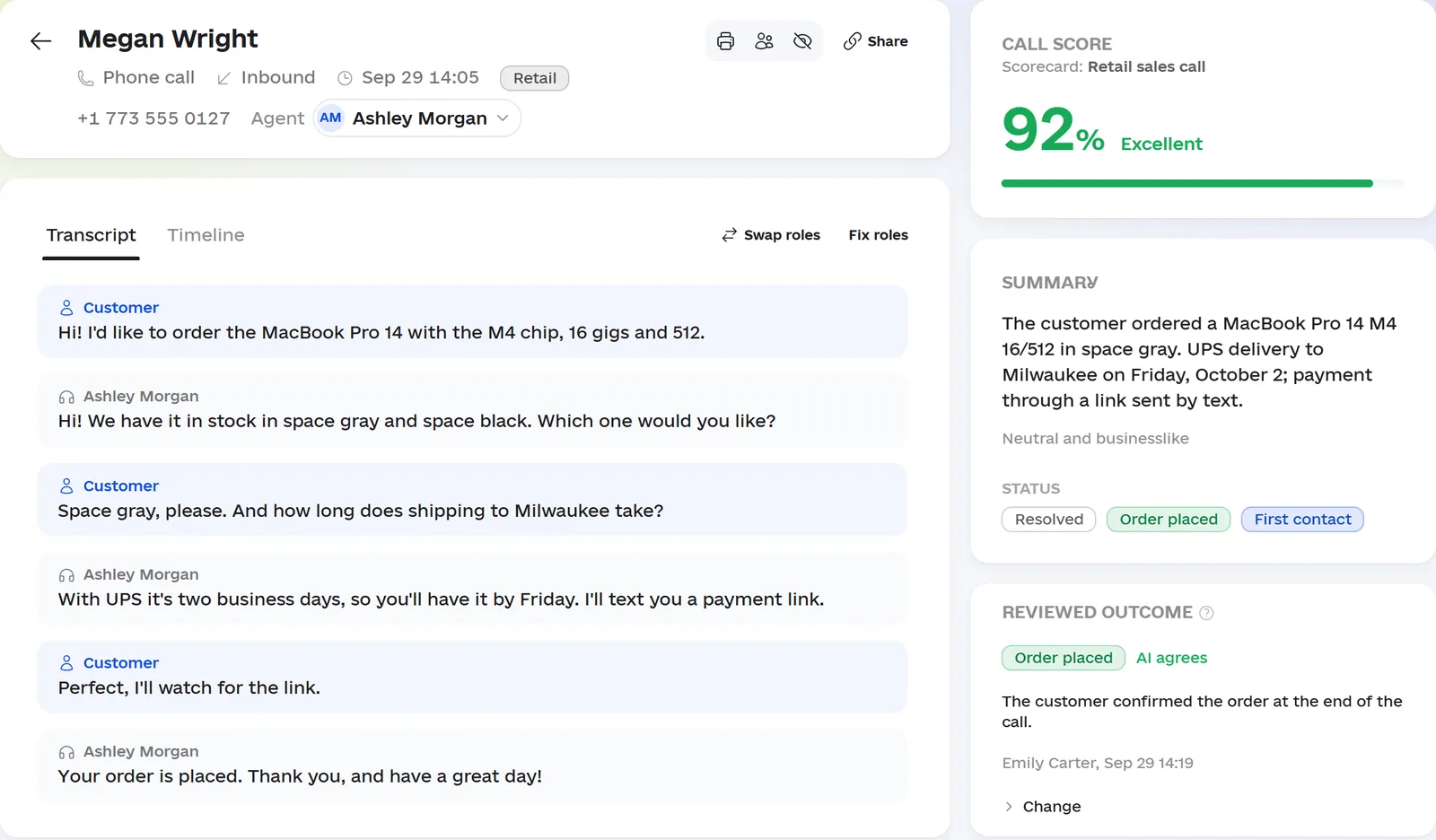
A sales manager who spot-checks calls hears 2–5% of them — nobody has time for more. The rest go unheard, and that’s exactly where a rep promises to call back and forgets, agrees that “it’s too expensive” and hangs up, or ends the call without a next step. You find out from a customer complaint or a dip in your close rate, after the same mistake has happened hundreds of times.
AI call analysis (also called conversation intelligence) doesn’t make you listen to more calls. Omniscore reads 100% of them, and your manager opens only the ones where something went wrong.
What slips through outside the sample
The usual losses that no phone system report will show you:
- Missed calls nobody returned. The customer already dialed your number — and bought from whoever picked up.
- Calls without a next step. “Let me think about it” — and nobody agreed on when to talk again.
- Objections left hanging. The customer says “that’s too much”, the rep says “well, that’s the price” and says goodbye.
- Promises that never became tasks. “I’ll call you back on Thursday” lives only in the rep’s head.
- Critical mistakes. Rudeness or a discount the company never offered — you hear about it only when the customer complains.
What AI does with every conversation
Omniscore takes recordings from your phone system (or from uploads) and emails from your team’s mailboxes. About two minutes after a call, the review is in the workspace:
- A transcript with speakers and timestamps. Customer and rep lines are split apart, so you can jump to the exact moment that matters. We measure transcription accuracy on your own recordings during the pilot and tell you the number before you sign anything.
- A score against your standard. Your call script becomes a scorecard with criteria, weights and critical errors. Every point comes with an explanation and a quote from the call.
- Summary, outcome and next step. What the call was about, how it ended — say, “Order placed” — and what to do next, without playing the recording.
- A deal and a task. AI links the call to the customer’s deal in the built-in sales CRM and turns “call me back on Thursday” into a task for the rep. If the customer has several open deals, the call waits in the “Review” queue for the rep to pick one.
- A flag for dropped calls. If the call cut off or a question was left open, AI marks it and suggests calling back.
Emails are scored with the same scorecard as calls, so each rep’s email quality sits right next to their call quality.
What to check on a call: a sample scorecard
We build the scorecard from your script. For an outbound call on an inbound lead, it might look like this:
| Criterion | What AI looks for in the call | Weight |
|---|---|---|
| Introduction and purpose | Gave the company name, their own name and the reason for the call right away | 5 |
| Needs discovery | Asked at least two open questions before pitching | 20 |
| Tailored offer | “You mentioned X — that’s why I’d suggest Y” instead of a list of features | 15 |
| Price | Stated it confidently and explained what’s included | 15 |
| Objections | On “that’s too expensive”, asked what they’re comparing with instead of giving up | 20 |
| Next step | Agreed on an action with a date: “I’ll send the proposal and call you Thursday at 10” | 20 |
| Recap | Repeated what was agreed at the end of the call | 5 |
Set critical errors separately: rudeness, a promise the company can’t keep, failing to take the customer’s contact details. A critical error zeroes the score no matter how the rest went, and it shows up under critical fails on the dashboard and in the agent leaderboard.
Instead of “7 out of 10”, your manager reads an explanation: “Next step missed: the rep said ‘I’ll give you a call sometime next week’ — no date.” You edit the scorecard in the workspace without a developer: test a new version on a real call before saving it, and roll back to the previous one in a click. Add your sales methodology to the scorecard, and AI will point out up to three missed opportunities in each call. They don’t affect the score — they’re material for coaching.
What the sales manager sees
The numbers tell you which calls to open first:
- Dashboard: conversations, inbound and outbound, missed and not returned, critical fails, conversion to order, repeat contacts and unusual topics.
- Agent leaderboard: score, critical fails, unreturned missed calls and the trend for every rep. Sort by “Needs attention” to see who to talk to first.
- Standards compliance: how often each step of the script is followed, across the team and per rep. You see where the whole team has a gap and where it’s a conversation with one person.
- Missed and not returned: only a connected call with that customer on the same day counts as a callback — not an attempt that went to voicemail.
- Ask Omni: ask in your own words — “Who haven’t we called back?”, “Which calls went badly yesterday?” Omni answers from your data with links to the calls, and suggests actions like a task or a note as cards. You can ask the same questions from your own ChatGPT or Claude through the Omniscore MCP connector.
Case study: a pilot at an installation and service company
An installation and service company: 9 reps, 6,300 conversations over three months, May–August 2026. No new hires and no new script — the only change was that the manager could see every call instead of one in forty. The metrics are calculated across all conversations.
| Metric | Before | After |
|---|---|---|
| Calls reviewed by the manager | a 2–5% sample | 100% |
| Close rate | 12.8% | 15.4% |
| Calls that followed the full checklist | 56% | 77% |
| Calls with an agreed next step | 47% | 66% |
| Price objections handled | 34% | 52% |
The ad budget didn’t change over the same period.
Pricing and how to start
The Omni core is $149 a month per workspace: AI call review, reports and Omni for a team of up to 10; a larger team adds $59 for each additional 5 people. Add the CRM, email and tasks as modules when you need them. AI review itself is billed from a prepaid balance as you go — about 2¢ for a 1–2 minute call. You can analyze every call, a sample, or only calls above a set length. Build your own setup in the calculator on the homepage; all the details are on the pricing page.
Your phone system stays as it is. We connect to it through its API or an SFTP folder, or you upload recordings — see all the options on the integrations page.
The pilot runs for 14 days on your own calls — up to 1,000 minutes, with no prepayment and no contract:
- We connect your calls and email.
- We turn your script into a scorecard and check the AI’s scores against your manager’s on 20–30 calls.
- AI reviews the conversations while your reps work as usual.
- We meet to walk through what we found — and you decide whether to continue.
You’ll see the first results on your data within 3–5 days. Request a pilot.